Redis Architecture Deep Dive: What I Learned Building High-Performance Systems
When I first started using Redis, I thought it was just a fast key-value store — a simple cache to put in front of my database. Then I built a real-time leaderboard system handling millions of updates per minute, and Redis became slow. Then I implemented a distributed lock that occasionally granted the lock to two clients simultaneously. Then I built a rate limiter that somehow let through more requests than it should.
Click here to access for free!!
Each failure forced me to dig deeper into Redis’s architecture. What I discovered was fascinating: Redis isn’t just fast because it’s in-memory. ==It’s fast because of carefully designed single-threaded architecture, efficient data structures, and clever use of I/O multiplexing==. Understanding why Redis works the way it does transformed how I used it — and when I chose not to use it.
This article shares what I learned studying Redis architecture: the design decisions that make it fast, the limitations those decisions create, why Lua scripts exist, how persistence actually works, and the subtle bugs you’ll encounter if you don’t understand what’s happening under the hood.

The Single-Threaded Revelation
The first surprising thing about Redis: it’s single-threaded. In an era of multi-core CPUs and concurrent programming, Redis processes one command at a time on a single thread.
When I first read this, I thought: “That’s a terrible design! Why not use all available CPU cores?” Then I built a system that needed to handle 100,000 requests per second, and Redis handled it easily on a single core while my multi-threaded application struggled with lock contention and context switching overhead.
Why Single-Threaded Works
Redis’s single-threaded model eliminates entire classes of problems:
No race conditions: Commands execute atomically. When you increment a counter, you know no other command is modifying it simultaneously. No locks needed.
No context switching overhead: Thread context switches are expensive. A single thread means no wasted CPU cycles on scheduling.
Predictable performance: Multi-threaded systems have unpredictable performance due to lock contention. Redis’s performance is consistent.
Simple mental model: You can reason about command execution linearly. Command A completes, then Command B starts. No interleaving.
Here’s what surprised me most: this “limitation” is actually Redis’s superpower for certain workloads.
// This is ATOMIC in Redis - no race conditions
// Thread 1
jedis.incr("counter");
// Thread 2 (happening simultaneously)
jedis.incr("counter");// In a multi-threaded database, these might conflict
// In Redis, they execute sequentially, atomically
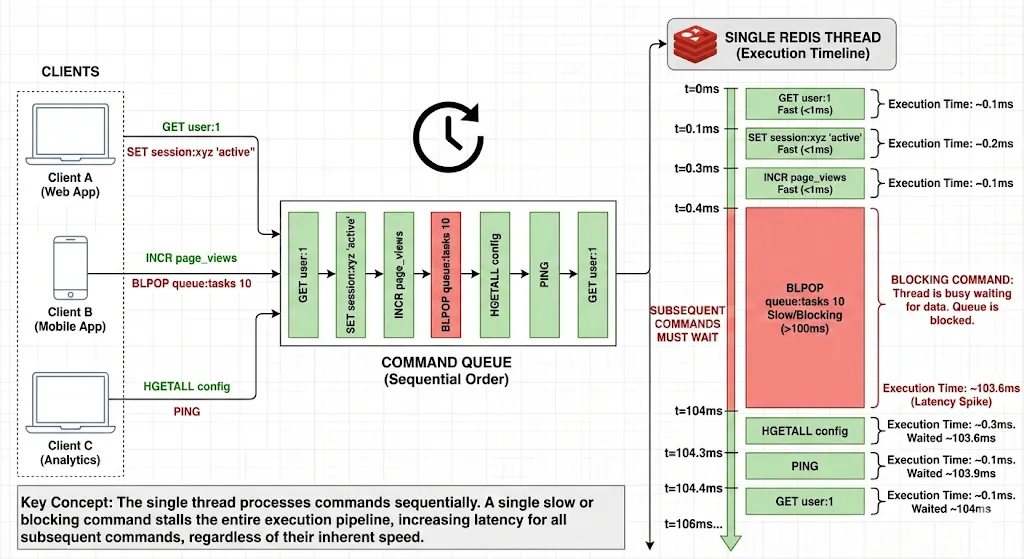
But single-threaded has a critical implication: slow commands block everything.
// This BLOCKS all other operations for up to 10 seconds!
jedis.blpop(10, "queue");
// During this time, every other Redis command waits
// Your simple GET request? Waiting.
// Your INCR? Waiting.
// Everything waits.
I learned this the hard way when a poorly written KEYS * command on a database with 10 million keys froze my entire application for 30 seconds.
I/O Multiplexing: The Speed Secret
If Redis is single-threaded, how does it handle thousands of simultaneous connections? The answer: I/O multiplexing with epoll/kqueue.
Here’s what happens when multiple clients connect:
- Redis uses epoll (Linux) or kqueue (BSD/Mac) to monitor thousands of socket connections
- When data arrives on any socket, the OS notifies Redis
- Redis reads the command, processes it, writes the response
- Moves to the next ready socket
All on a single thread. No thread-per-connection overhead.
Client 1 sends: SET user:1 "John"
Client 2 sends: GET user:1
Client 3 sends: INCR counter
Redis processes:
1. SET user:1 "John" → OK (500 nanoseconds)
2. GET user:1 → "John" (300 nanoseconds)
3. INCR counter → 1 (400 nanoseconds)Total time: ~1.2 microseconds
All clients get responses nearly instantly
This architecture scales beautifully up to about 100,000 connections on modern hardware. Beyond that, you need Redis Cluster.
Data Structures: Why Redis Is Fast
Redis isn’t just a hash table. It has optimized data structures for different use cases, and understanding them changed how I modeled data.
Strings: Not What You Think
Redis strings aren’t simple strings. They’re binary-safe byte arrays up to 512MB, with optimizations for integers.
// Stored as integer (efficient)
jedis.set("counter", "42");
jedis.incr("counter"); // Fast integer operation
// Stored as string
jedis.set("name", "John Doe");
jedis.append("name", " Jr."); // String operation// Stored as raw bytes
byte[] data = serializedObject();
jedis.set("object".getBytes(), data); // Binary data
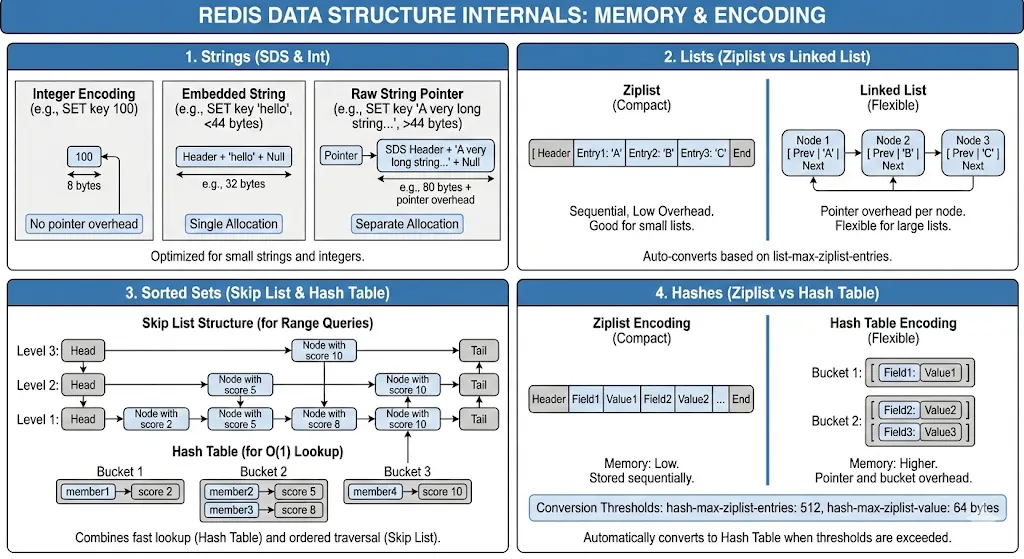
I discovered Redis uses different encodings based on value:
- Small integers: Stored as actual integers (64-bit)
- Short strings (<44 bytes): Embedded in the value object
- Long strings: Separate allocation with pointer
Lists: Dual-Purpose Data Structure
Redis lists are implemented as linked lists (quick head/tail operations) or zip lists (memory-efficient for small lists).
// Use as queue (FIFO)
jedis.lpush("queue", "task1", "task2", "task3");
String task = jedis.rpop("queue"); // task1
// Use as stack (LIFO)
jedis.lpush("stack", "item1", "item2");
String item = jedis.lpop("stack"); // item2// Use as capped list (recent items)
jedis.lpush("recent", "item1");
jedis.ltrim("recent", 0, 99); // Keep only 100 most recent
The gotcha: Lists are linked lists. Accessing middle elements is O(N). I learned this when my LINDEX list 50000 command took seconds.
Sorted Sets: The Secret Weapon
Sorted sets are why I chose Redis for leaderboards. They’re implemented as skip lists + hash tables — efficient for both score-based and member-based lookups.
// Leaderboard: O(log N) insertion
jedis.zadd("leaderboard", 9500, "player:123");
jedis.zadd("leaderboard", 8700, "player:456");
// Top 10: O(log N + 10)
Set<String> topPlayers = jedis.zrevrange("leaderboard", 0, 9);// Player rank: O(log N)
Long rank = jedis.zrevrank("leaderboard", "player:123");// Score: O(1)
Double score = jedis.zscore("leaderboard", "player:123");
Skip lists provide O(log N) for add/remove/rank operations. This is why Redis sorted sets can handle millions of members efficiently.
But here’s what surprised me: sorted sets consume significant memory. Each member is stored twice — once in the skip list, once in the hash table. For my 10 million member leaderboard, this was 500MB+ of RAM.
Hashes: Memory Optimization
Hashes seemed simple until I discovered ziplist encoding.
// Small hash: stored as ziplist (memory efficient)
jedis.hset("user:123", "name", "John");
jedis.hset("user:123", "email", "john@example.com");
jedis.hset("user:123", "age", "30");
// Memory: ~100 bytes
// Same data as individual keys
jedis.set("user:123:name", "John");
jedis.set("user:123:email", "john@example.com");
jedis.set("user:123:age", "30");
// Memory: ~300 bytes (3x more!)
Redis uses ziplist encoding for small hashes (<512 fields, values <64 bytes). This encoding is incredibly memory-efficient. When building a system with millions of user profiles, switching to hashes reduced memory usage by 60%.
Persistence: The Durability Trade-off
Redis is in-memory, but it can persist data. How this works is critical to understand.
RDB Snapshots: Point-in-Time Backups
RDB creates binary snapshots of your dataset:
# redis.conf
save 900 1      # Save if 1 key changed in 15 minutes
save 300 10     # Save if 10 keys changed in 5 minutes
save 60 10000   # Save if 10k keys changed in 1 minute
Here’s what happens during a save:
- Redis forks a child process (copy-on-write)
- Child process writes snapshot to temporary file
- Child finishes, renames temp file to dump.rdb
- Parent process continues serving requests
The fork is the tricky part. On a server with 10GB of Redis data and active writes, the fork can take 200–500ms. During this time, Redis doesn’t respond to any commands. I learned this when my monitoring showed 500ms latency spikes every 5 minutes, aligned perfectly with RDB saves.
Solution: Ensure you have enough free memory (2x your dataset) and use a replica for RDB saves.
AOF: Append-Only File
AOF logs every write command:
# redis.conf
appendonly yes
appendfsync everysec  # fsync every second (good balance)
# appendfsync always   # fsync every command (slow but safe)
# appendfsync no       # let OS decide (fast but risky)
Every write command is appended to a file:
SET user:1 "John"
INCR counter
ZADD leaderboard 100 player:1
DEL old:key
On restart, Redis replays these commands to rebuild state.
The problem: AOF grows forever. After a week, my AOF was 50GB for a 2GB dataset. Solution: AOF rewrite.
// Trigger AOF rewrite
jedis.bgrewriteaof();
AOF rewrite creates a new, compact AOF with current state. But like RDB, it requires a fork.
What I Use in Production
- Development: No persistence (performance)
- Caches: RDB only, infrequent saves (acceptable loss)
- Sessions: AOF with
appendfsync everysec(balance) - Critical data: AOF with
appendfsync always+ replicas (durability)
Lua Scripts: Atomic Operations
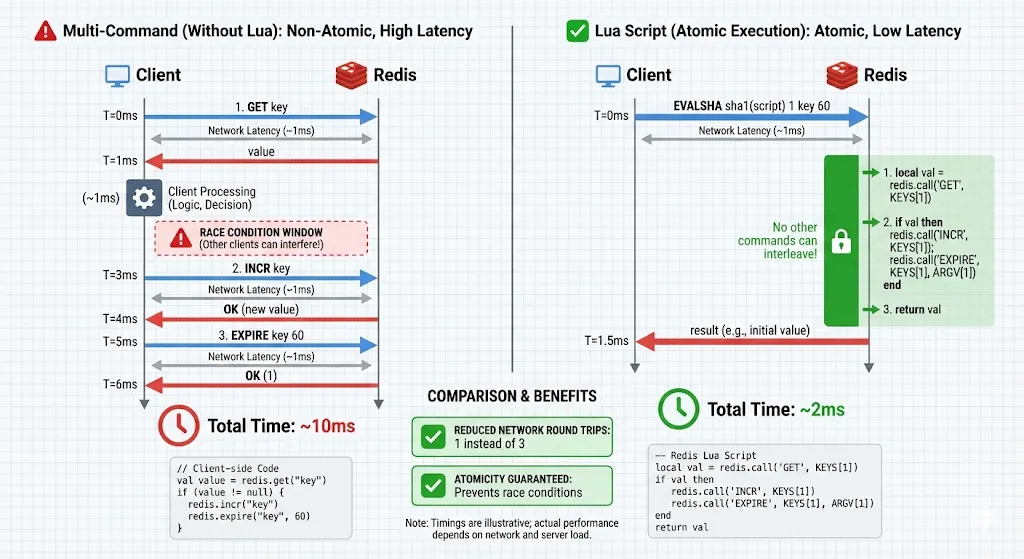
Here’s when I understood why Lua scripts exist: I was building a rate limiter that needed to:
- Check if rate limit exceeded
- If not, increment counter
- Set expiry on counter
In separate commands:
// Race condition!
String count = jedis.get("rate:user:123");
if (Integer.parseInt(count) < 100) {
    jedis.incr("rate:user:123");
    jedis.expire("rate:user:123", 60);
}
Between GET and INCR, another thread could increment. The rate limiter breaks.
Solution: Lua script:
-- rate_limit.lua
local key = KEYS[1]
local limit = tonumber(ARGV[1])
local ttl = tonumber(ARGV[2])
local current = redis.call('GET', key)
if current == false then
    current = 0
else
    current = tonumber(current)
endif current < limit then
    redis.call('INCR', key)
    redis.call('EXPIRE', key, ttl)
    return 1
else
    return 0
end
// Load script once
String sha = jedis.scriptLoad(luaScript);
// Execute atomically
Object result = jedis.evalsha(sha,
    Arrays.asList("rate:user:123"),
    Arrays.asList("100", "60")
);boolean allowed = result.equals(1L);
Why Lua scripts are powerful:
- Atomic: Entire script executes without interruption
- Reduces round trips: One network call instead of multiple
- Server-side logic: Complex operations without client-side coordination
When to use Lua:
- Complex atomic operations (rate limiting, distributed locks)
- Reducing round trips for multi-step operations
- Server-side data processing
When NOT to use Lua:
- Simple single commands (
GET,SET) - Long-running computations (blocks Redis)
- When readability matters (Lua is harder to maintain)
I built a distributed lock, deduplication system, and sliding window rate limiter all with Lua scripts. Each eliminated race conditions that were impossible to fix with separate commands.
The KEYS vs ARGV Pattern
Understanding the difference is important:
-- KEYS: Passed to support cluster mode (hash slot calculation)
local key = KEYS[1]
-- ARGV: Additional arguments
local value = ARGV[1]
local ttl = tonumber(ARGV[2])
In Redis Cluster, all keys in a script must hash to the same slot. Using KEYS properly ensures this.
Memory Management: What Actually Happens
Redis’s memory management surprised me. It doesn’t use garbage collection — it uses reference counting and explicit memory allocation.
Memory Limits and Eviction
# redis.conf
maxmemory 2gb
maxmemory-policy allkeys-lru
Eviction policies I’ve used:
- noeviction: Return errors when memory full (for caches that can’t lose data)
- allkeys-lru: Evict least recently used keys (good for general caches)
- volatile-lru: Evict LRU among keys with TTL (when you want persistent keys safe)
- allkeys-random: Random eviction (uniform access patterns)
I learned LRU in Redis isn’t true LRU — it samples random keys and evicts the least recently used among the sample. This is faster than maintaining a true LRU list.
Memory Fragmentation
This bit me hard. After running Redis for weeks, INFO memory showed:
used_memory_human: 2.5GB
used_memory_rss_human: 4.8GB
mem_fragmentation_ratio: 1.92
Fragmentation ratio of 1.92 meant Redis was using 4.8GB of RAM for 2.5GB of data — wasting 2.3GB!
Why fragmentation happens:
- Redis allocates memory from OS in chunks
- Keys are created and deleted, leaving holes
- Over time, holes accumulate
Solutions:
- Restart Redis periodically (memory gets defragmented)
- Use
activedefrag yes(Redis 4.0+, automatic background defragmentation) - Avoid workloads with lots of key creation/deletion
Memory Optimization Tricks
1. Use hashes for related data:
// Bad: 1000 keys = ~100KB overhead
for (int i = 0; i < 1000; i++) {
    jedis.set("user:" + i + ":name", "User" + i);
}
// Good: 1 hash = ~20KB overhead
for (int i = 0; i < 1000; i++) {
    jedis.hset("users", String.valueOf(i), "User" + i);
}
2. Use appropriate data structures:
// For set membership checks with millions of items
// Bloom filter (probabilistic, memory efficient)
// vs SET (exact, memory intensive)
3. Set TTLs to expire unused data:
jedis.setex("session:123", 3600, sessionData); // Auto-expire in 1 hour
Pipelining: Massive Throughput Gains
Pipelining was a game-changer for bulk operations.
Without pipelining:
// 1000 operations = 1000 network round trips
for (int i = 0; i < 1000; i++) {
    jedis.set("key" + i, "value" + i); // ~1ms per operation = 1 second total
}
With pipelining:
Pipeline pipeline = jedis.pipelined();
for (int i = 0; i < 1000; i++) {
    pipeline.set("key" + i, "value" + i);
}
pipeline.sync(); // Single network round trip = ~10ms total
100x faster! Pipelining batches commands, sends them together, and receives all responses at once.
Important: Pipelined commands aren’t transactional. They execute independently. For atomicity, use Lua scripts or MULTI/EXEC.
Transactions: Not What You Expect
Redis transactions surprised me:
Transaction t = jedis.multi();
t.set("key1", "value1");
t.set("key2", "value2");
t.incr("counter");
t.exec();
Redis transactions are NOT like SQL transactions:
- No rollback on error (!)
- Commands execute in sequence, atomically
- If a command fails, others still execute
I learned this when a typo in a command caused errors, but other commands in the transaction still executed. I expected a rollback. Redis doesn’t do that.
What transactions guarantee:
- Commands execute atomically (no other commands interleave)
- Commands execute in order
- All commands execute or none do (network failure case)
For true atomic execution, use Lua scripts, not MULTI/EXEC.
Redis Cluster: Scaling Horizontally
When single-instance Redis hit limits (100GB+ datasets, millions of ops/sec), I used Redis Cluster.
How Sharding Works
Redis Cluster divides 16,384 hash slots across nodes:
CRC16(key) % 16384 = hash slot
Slots 0-5460 → Node A
Slots 5461-10922 → Node B
Slots 10923-16383 → Node C
Critical limitation: Multi-key operations only work if keys are in the same slot.
// These might be on different nodes - ERROR
jedis.mget("user:1", "user:2");
// Force same slot with hash tags
jedis.mget("{user}:1", "{user}:2"); // {user} ensures same slot
I learned about hash tags when my Lua script failed with “CROSSSLOT” error. Hash tags {...} ensure keys hash to the same slot.
Replication and High Availability
Each cluster node can have replicas:
Master A 5460
 → Replica A1
Master B 10922
 → Replica B1
Master C 16383
 → Replica C1
When a master fails, its replica promotes automatically. I tested this by killing master nodes — promotion took 5–15 seconds, during which writes to those slots failed.
Debugging and Monitoring
SLOWLOG: Finding Performance Issues
// Check slow commands
List<Slowlog> slowlogs = jedis.slowlogGet();
for (Slowlog log : slowlogs) {
    System.out.println(log.getTimeStamp() + ": " +
                      log.getArgs() + " took " +
                      log.getExecutionTime() + "μs");
}
This showed me that KEYS * commands and unindexed sorted set operations were killing performance.
INFO Command: System Health
String info = jedis.info();
// Look for:
// - used_memory
// - connected_clients
// - evicted_keys
// - keyspace_hits / keyspace_misses (cache hit rate)
I monitor these metrics and alert when:
- Memory usage > 80%
- Cache hit rate < 95%
- Evicted keys > 0 (unless expected)
- Connected clients approaching limit
Lessons Learned
After years of building systems with Redis, here’s what matters:
1. Understand single-threaded implications: Slow commands block everything. Use SCAN instead of KEYS, avoid BLPOP with long timeouts on busy instances.
2. Choose the right data structure: Sorted sets for leaderboards, hashes for objects, sets for unique membership, streams for event logs.
3. Use Lua for atomicity: Any multi-step operation that needs consistency requires a Lua script.
4. Memory is precious: Monitor fragmentation, use hashes to reduce overhead, set TTLs, consider eviction policies carefully.
5. Persistence has trade-offs: RDB is fast but loses data, AOF is durable but larger, both require forks that can cause latency spikes.
6. Pipelining for bulk operations: Network round trips are expensive — batch commands whenever possible.
7. Monitor relentlessly: SLOWLOG, INFO, and memory metrics prevent disasters before they happen.
Redis isn’t just a fast cache. It’s a carefully designed data structure server with specific trade-offs. Understanding those trade-offs — the single-threaded model, memory management, persistence options, and when to use Lua scripts — transforms Redis from a black box into a predictable, powerful tool.
The architecture choices that seemed strange when I started (single-threaded? no rollback?) now make perfect sense. They enable Redis to be simple, fast, and predictable — exactly what you need for high-performance systems.